
BP Cookies Manager Tutorial: Edit, Block and Export
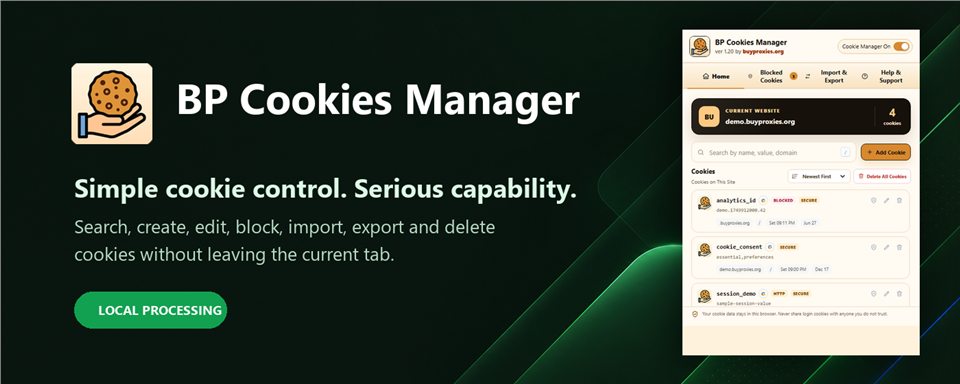
This tutorial explains how to use BP Cookies Manager as a cookie editor, cookie viewer, cookie blocker, import/export cookie tool, and browser cookie manager for the current website.
Quick answer: Open the extension on a normal HTTP or HTTPS page, review current website cookies, search by name, value, or domain, add or edit cookie fields, delete unwanted cookies, block recurring cookie names, and import or export cookies in JSON, Netscape, or Cookie header format.
Before you start using BP Cookies Manager
BP Cookies Manager works on the current browser tab. Open a normal website first, then open the extension from the toolbar. Internal browser pages such as extension settings do not expose normal website cookies.
Cookies can contain active login sessions, authentication tokens, preferences, cart data, tracking IDs, and A/B test values. Treat exported cookies like sensitive data.
View cookiesEdit cookiesDelete cookiesBlock cookie namesImport JSON, Netscape, or Cookie header dataExport JSON, Netscape, or Cookie header data
1. View and search current website cookies
The Home screen is the main cookie viewer. It lists cookies for the current website and lets you filter them by name, value, domain, or path.
- Open the website you want to inspect.
- Open BP Cookies Manager from the toolbar.
- Check the site card and cookie count.
- Search by cookie name, value, domain, or path.
- Sort by cookie name, newest first, or expiration date.
- Use the cookie actions to edit, delete, or block specific cookies.
2. Add or edit a cookie
Use Add Cookie to create a new cookie, or use the edit action beside an existing cookie. The editor supports the fields developers need for real browser testing.
- Set the cookie name and value.
- Choose the domain and path. The domain must match the current website.
- Set expiration, or mark it as a session cookie.
- Choose SameSite: Unspecified, Lax, Strict, or None.
- Enable Secure for HTTPS-only cookies.
- Enable HTTP only when page scripts should not read the cookie.
- Save the cookie and refresh the website if the app needs to re-read it.
SameSite=None requires Secure in modern browsers, and Secure cookies require HTTPS.

3. Delete one cookie or all current website cookies
Delete a single cookie when you want a targeted reset, or use Delete All Cookies when you want to clear every cookie listed for the current website. This is useful for session debugging, logout testing, cart testing, consent banner testing, and account-flow troubleshooting.

4. Block recurring cookie names
The Blocked Cookies screen is for names that keep coming back. Add a cookie name, such as _ga, and BP Cookies Manager removes matching cookies when the site recreates them.
- Open Blocked Cookies.
- Enter the exact cookie name.
- Click Block Cookie Name.
- Reload or browse the site normally.
- Remove the name from the blocklist when you want the site to keep that cookie again.
The browser reports cookies after they are created, so a blocked cookie can exist briefly before the extension removes it.
5. Import and export cookies
The Import & Export screen moves cookie data between tools and browsers. BP Cookies Manager supports three practical formats.
name=value; name2=value2 request-header format.Only import cookies from sources you trust. Imported authentication cookies can grant access to accounts.


6. Detect new cookies after a page load
When a finished page load creates new cookies, BP Cookies Manager can show an in-page notification. Click the notification to open the cookie manager with those new cookies highlighted.
This is useful for seeing what changes after login, consent banner acceptance, checkout steps, form submissions, analytics scripts, or account redirects.
All BP Cookies Manager features explained
Use the reference below to find the controls for viewing, editing, blocking and transferring cookies.
Use BP Cookies Manager with care
Cookies are small, but they can carry powerful session data. Use the editor for development and testing, use export only when you understand the risk, and use blocking when a site keeps recreating cookies you do not want.
BP Cookies Manager FAQ
What is BP Cookies Manager?
BP Cookies Manager is a browser cookie manager, cookie editor, and cookie viewer for the current website.
How do I edit a cookie?
Open the current website, open BP Cookies Manager, choose a cookie, edit its fields, and save the change.
Can it block cookies?
Yes. Add a cookie name to the site blocklist and matching cookies are removed when the site recreates them.
Which import and export formats are supported?
BP Cookies Manager supports JSON backups, Netscape cookie files, and Cookie header strings.
Why did a deleted cookie return?
The website may recreate required cookies when it reloads. Add the cookie name to the blocklist if it should keep being removed.
Are exported cookies sensitive?
Yes. Exported cookies can include login or session data. Never share authentication cookies with anyone you do not trust.