Datacenter proxy fundamentals
What Is a Datacenter Proxy? Types, Uses and Trade-Offs
A datacenter proxy forwards requests through an IP address from hosted server infrastructure, rather than a household or mobile connection. A dedicated proxy server is a separate ownership choice: a datacenter IP can be assigned exclusively or shared. This guide separates those terms and explains the practical effects on sessions, cost and destination compatibility.
Quick answer: Datacenter proxies are normally chosen for speed, predictable authentication, fixed endpoints and cost-efficient scale. They differ from residential proxies because their IP addresses are associated with hosting networks, not consumer internet providers. That makes them practical for many technical workflows, but it can also make the network type easier for a destination to classify. The right choice depends on the target, protocol, session length and acceptable sharing model.
How a datacenter proxy works
Your application connects to the proxy using a host, port and, when required, credentials. The proxy forwards supported traffic to the destination and returns the response. The destination sees the proxy’s public IP address as the connection source. Encryption to an HTTPS website still depends on HTTPS between the client and destination; simply adding a proxy does not make every connection encrypted or anonymous.
A datacenter proxy server is usually hosted in a commercial facility with reliable connectivity. Providers can assign one IP to one customer, share it among a limited number of customers, or rotate traffic through a larger pool. Those products behave differently, so “datacenter” describes the network origin rather than one universal service model.
Datacenter proxy types
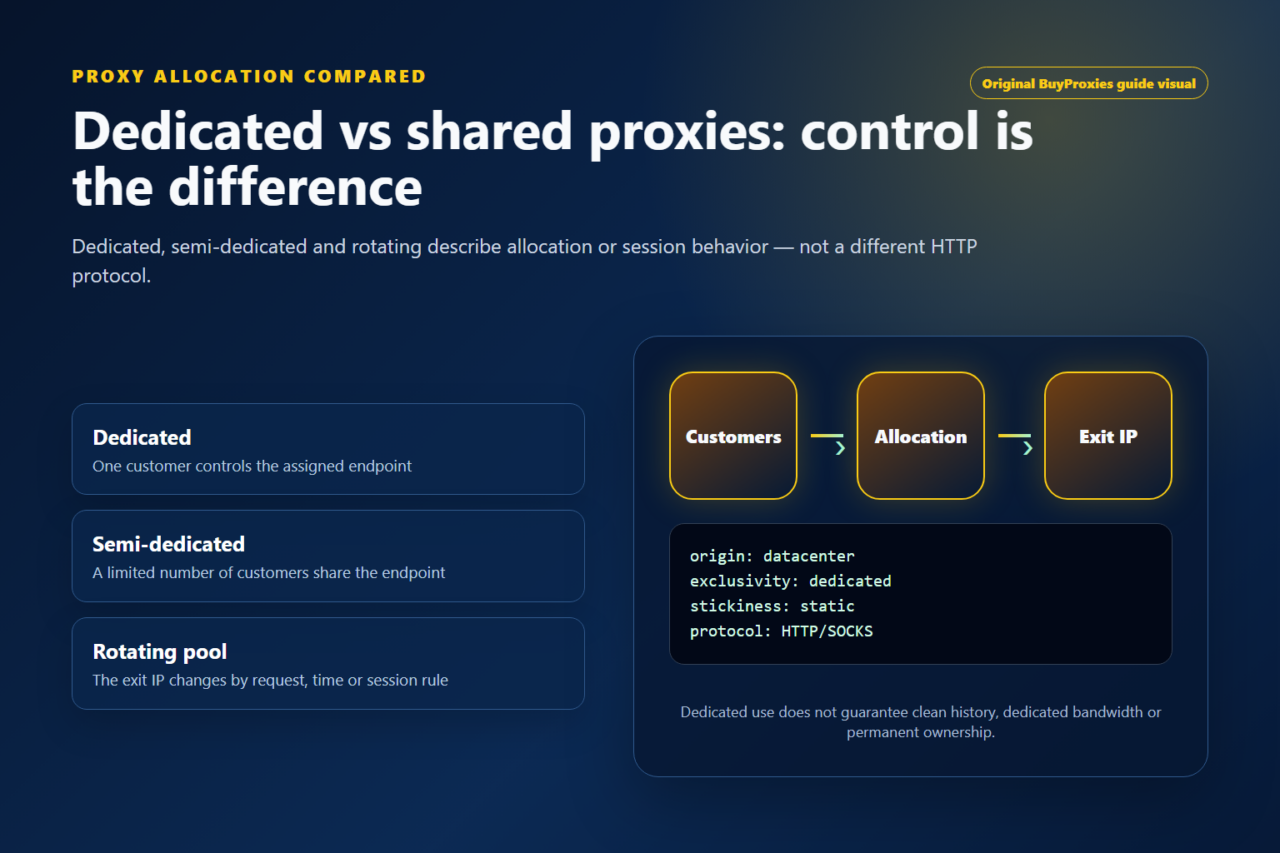
Dedicated proxy
One customer controls the assigned address. This is generally the best fit for stable sessions, predictable reputation and repeated access from the same IP.
Semi-dedicated proxy
A limited number of customers share the address. It costs less, but another user’s traffic can influence reputation or availability.
Rotating proxy
The service changes the exit address according to a request, time or session rule. Rotation can help distribute permitted workloads but is unsuitable for every login or stateful session.
Static proxy
The endpoint keeps the same public IP. Static behavior is useful when a tool, allowlist or test needs repeatable identity and easier troubleshooting.
Datacenter proxies compared with residential proxies
| Factor | Datacenter proxy | Residential proxy |
|---|---|---|
| IP source | Hosting or server infrastructure | Consumer ISP connection or residential pool |
| Typical strength | Speed, stability and cost control | Consumer-network classification and broader location pools |
| Session options | Often fixed dedicated endpoints | Often rotating or sticky pool sessions |
| Best fit | SEO tools, monitoring, QA, development and permitted scraping | Workflows that specifically require a consumer-network origin |
| Main trade-off | Hosting ranges may be easier to identify | Usually higher cost and more variable routing |
Neither type is automatically “best.” Choose based on the destination and the job. Our datacenter vs residential proxy comparison covers the decision in more detail.
Network ownership, ASN and IP classification
A public IP belongs to a routed network announced under an autonomous system number, or ASN. Hosting companies, cloud platforms and connectivity providers normally announce large address ranges from their own networks. This is why a destination can often classify a datacenter address even when the proxy is fast, private and newly assigned. Classification is not the same as a block: it is one signal a destination may combine with traffic history, request behavior, account state and its own access policy.
For procurement, ask the provider what network type it sells and whether replacements remain within the same general infrastructure. Do not ask for a promise that an address is invisible. Instead, test whether the real destination accepts the route under a permitted workload. Network registration data can also change, so treat a lookup as evidence for the current test rather than a permanent guarantee. The IANA autonomous system number registry is an authoritative reference for how ASN resources are organized.
Allocation models and session behavior
Allocation describes who can use an endpoint; rotation describes when the exit IP changes. They are separate decisions. A dedicated static address is usually easiest to allowlist, monitor and investigate because one customer controls the assignment and the route remains stable. A semi-dedicated endpoint reduces cost but introduces limited shared history. A rotating pool can distribute independent requests, but it can break a login, checkout, upload or other stateful sequence if the IP changes mid-session.
Match the rotation boundary to the application boundary. Keep one endpoint for the complete transaction when cookies, server-side state or an authenticated session must persist. For independent public-page checks, a controlled rotation rule may be reasonable. Record the proxy identifier with each result so an operator can reproduce a failure. If the software silently retries through a different endpoint, logs should preserve both attempts rather than making the second response look like the original route.
Datacenter proxy procurement checklist
| Question | Evidence to request or test |
|---|---|
| What is the network type? | A precise statement that the inventory is datacenter, plus a sample IP that can be independently classified. |
| Who controls each address? | Dedicated, semi-dedicated or pool terms that explain concurrent customer use rather than relying on the word “private.” |
| Which protocols work? | A documented HTTP, HTTPS-proxy or SOCKS configuration tested in the exact browser, library or application. |
| How are clients authorized? | Username/password or source-IP allowlisting, including the procedure for changing credentials or the allowlisted address. |
| How are failures handled? | Replacement terms, support response path and enough logs to distinguish a dead endpoint from a target denial. |
| Can the workload scale? | A small paid sample tested at realistic concurrency before a larger order, with latency and success-rate measurements. |
Datacenter proxy troubleshooting matrix
| Symptom | Likely layer | First controlled test |
|---|---|---|
| Connection refused or timeout | Endpoint, port, firewall or route | Test one simple HTTPS URL with a short connect timeout and confirm the assigned host and port. |
| Proxy authentication required | Credentials or source-IP authorization | Re-enter the username and password, or confirm the current client IP is on the provider allowlist. |
| IP check works but the target denies access | Destination policy or IP history | Preserve the response code, stop aggressive retries and ask whether the intended workflow is supported. |
| Location databases disagree | Geolocation data | Compare the actual destination with more than one lookup and document which service drives the requirement. |
| Performance drops under load | Concurrency, target latency or connection reuse | Return to one request, then increase gradually while recording p50 and p95 response time plus failure rate. |
What are datacenter proxies used for?
SEO and regional search checks
Rank tracking and search-quality teams use proxies to repeat location-specific checks without sending every request from one office connection. The proxy supplies a network-location signal, while language, cookies, account state and search parameters may still affect results. Record the endpoint and test conditions so comparisons remain meaningful.
Public-data collection
Datacenter proxies can distribute requests for approved research, price monitoring and public-web collection. Start with conservative concurrency, respect published terms and rate limits, and store response codes. A proxy does not grant permission to bypass authentication or technical access controls.
Website and application QA
Developers use stable proxies to test localization, consent banners, ad placement, checkout logic and network error handling. Fixed endpoints are especially useful when a staging system uses IP allowlists. Pair the proxy test with browser-language and clean-session checks rather than assuming the IP controls every location signal.
Monitoring and automation
A dedicated datacenter proxy offers a consistent route for uptime checks, API monitoring and scheduled business processes. Timeouts, retries and connection pooling still need sensible configuration. A fast proxy cannot repair a slow target or an application that opens excessive connections.
HTTP, HTTPS and SOCKS options
HTTP proxies are widely supported by browsers, SEO applications and HTTP clients. An HTTP proxy can tunnel an HTTPS destination when the client uses the CONNECT method; the destination connection remains HTTPS. SOCKS works at a lower level and can support more application types when the client implements it. Read our HTTP vs SOCKS proxy guide before ordering if your software names a specific protocol.
How to evaluate a datacenter proxy
- Confirm the network type. Make sure the product is explicitly described as datacenter and not residential or mobile.
- Choose the sharing model. Prefer dedicated use when reputation control or persistent sessions matter.
- Match the protocol. Verify HTTP, HTTPS or SOCKS support against the exact application.
- Test authentication. Check username/password credentials or source-IP authorization before importing a full list.
- Verify location. Compare the IP using the IP location checker and the actual destination.
- Test the real target. A successful request to an IP-check service does not prove compatibility with every website.
- Measure consistency. Record latency and status codes across several requests instead of relying on one result.
Common misconceptions
- “A proxy hides every identifying signal.” Websites can observe cookies, account history, browser characteristics and behavior in addition to the IP address.
- “Dedicated means residential.” Dedicated describes exclusive assignment; it does not describe the network source.
- “More threads always improve performance.” Excessive concurrency can increase errors, rate limiting and target load.
- “The country label is exact.” IP geolocation databases can disagree, so validate with the services that matter.
- “Every application follows system proxy settings.” Some software uses its own network stack or needs proxy configuration inside the application.
Datacenter proxy FAQ
Are datacenter proxies fast?
They are commonly fast because they run on hosted network infrastructure, but actual latency depends on distance, routing, target response time, load and provider configuration.
Can I get a dedicated datacenter IP?
Yes. A dedicated private proxy assigns the address to one customer. Confirm the provider’s definition and replacement terms before buying.
Are datacenter proxies suitable for scraping?
They are suitable for permitted public-data collection when the target, request rate and application support them. Follow the destination’s rules and begin with modest concurrency.
Can websites detect a datacenter proxy?
Some services classify IP ranges by network owner or traffic history. A proxy should not be presented as undetectable, and compatibility must be tested against the real target.
What should I test before ordering a larger datacenter proxy pool?
Test one sample endpoint for authentication, visible IP, target compatibility, latency and repeatability. Then increase concurrency gradually and record response codes before committing to a larger allocation.
Choose a datacenter proxy by workload
Start with the required location and protocol, then decide whether dedicated or limited shared use is appropriate. Test one endpoint with the real destination before scaling. For practical setup steps, use the Proxy Formatter and Proxy Tester. For the underlying HTTP behavior, see MDN’s technical guide to proxy servers and tunneling.
Updated practical checklist
For a datacenter endpoint, record network ownership separately from the country reported by an IP-location service. Test an IP-check request first, then one permitted request to your actual destination: the first establishes the visible exit for that request, while the second reveals destination-specific access. If the destination rejects hosting-network addresses, changing credentials or buying exclusive assignment will not change the network origin.
| Before you start | What to confirm |
|---|---|
| Proxy type | Dedicated for important workflows; semi-dedicated for lower-risk testing. |
| Protocol | Use HTTP/HTTPS unless the tool clearly supports SOCKS5. |
| Authentication | Check username/password format or IP whitelist before blaming the proxy. |
| Quality control | Run a tester check, then verify location and speed. |
Should I use dedicated proxies for this?
Use dedicated proxies when the task depends on clean reputation, stable sessions or easy troubleshooting.
What should I check first if the proxy fails?
Check format, protocol and authentication first. Then test speed, location and target-specific blocking.
Useful next steps: proxy setup guides, proxy tools, and dedicated proxy plans.